How to Remove Hypothecation from RC Online: Step-by-Step Guide
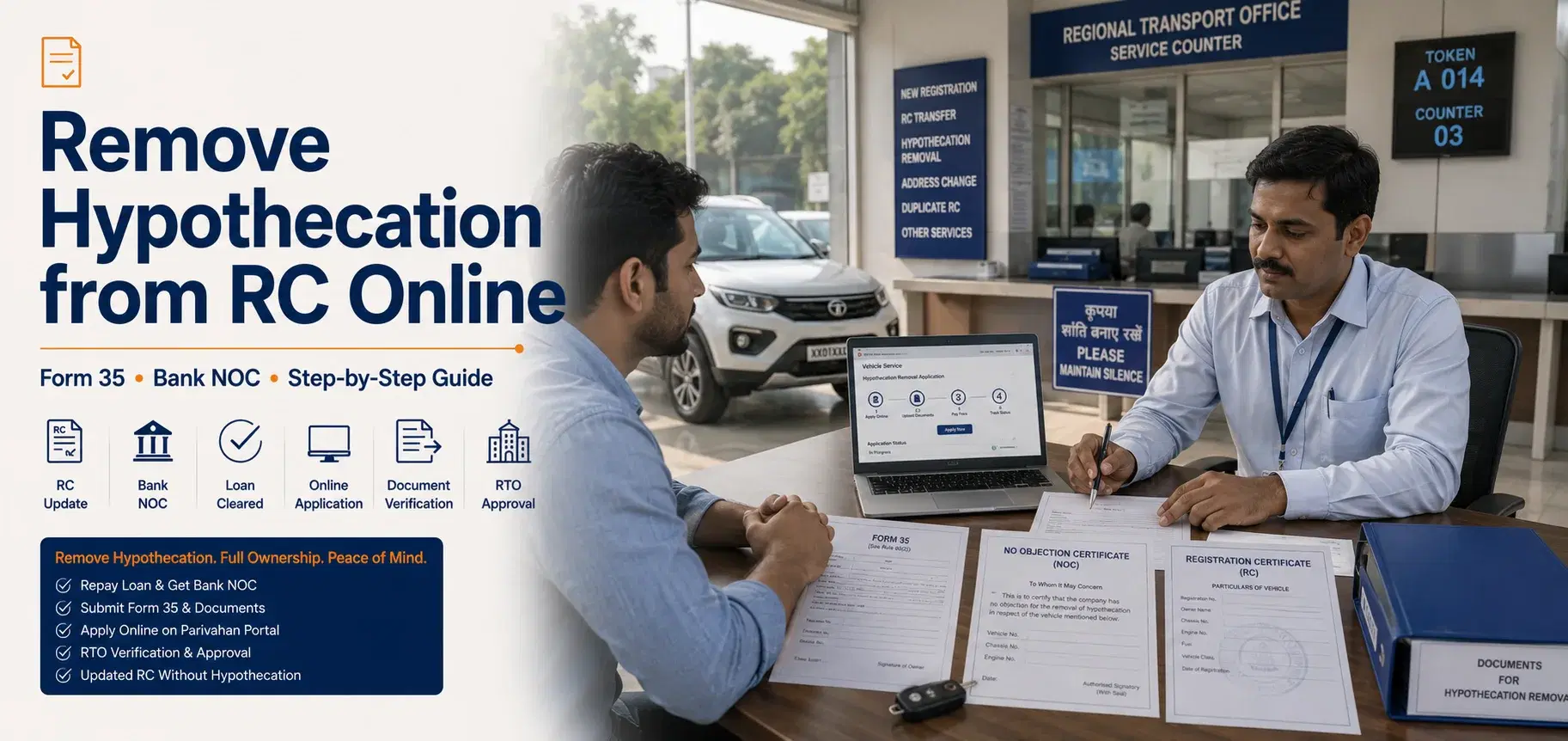
You've paid off your car or bike loan — congratulations! But here's the catch: your vehicle's Registration Certificate (RC) still shows the bank or NBFC as a financial stakeholder. That entry is called a hypothecation, and until you remove it, you don't fully own your vehicle on paper.
75% of vehicle owners didn't even know they needed to remove hypothecation after loan closure. That's a costly oversight. An active hypothecation on your RC can block vehicle resale, complicate insurance claims, and create legal ownership disputes. The good news?
You can now complete the hypothecation removal online via the Parivahan Portal or Vahan Portal — without stepping into an RTO in most states. This guide covers everything: Form 35 filling, NOC collection, online application steps, state-specific processes, fees, and status tracking.
What is Hypothecation and Why Must You Remove It?
Hypothecation is a legal charge placed on your vehicle by a lender (bank or NBFC) when you take a car loan or two-wheeler loan. It means the financier has a claim over your vehicle until the loan is fully repaid. This charge is recorded on your RC (Registration Certificate) and is visible to anyone who checks your vehicle's details.
Once your loan is closed — either through regular EMIs or foreclosure — the hypothecation must be formally terminated. It doesn't disappear on its own.
What Happens if You Don't Remove Hypothecation?
Ignoring this step has real consequences:
Resale problems: Buyers and platforms like Cars24 or Spinny treat a hypothecated vehicle as an encumbered asset. As Mayur Kacholiya, Head – Motor Product at Go Digit General Insurance, explains: "An active hypothecation can delay resale transactions and may raise concerns for buyers or intermediaries who treat the vehicle as an encumbered asset."
Insurance claim issues: Insurers may scrutinise or delay claims if the RC shows an active lender interest.
Legal ownership disputes: The lender technically retains a claim on the vehicle until the RC is updated.
Transfer of ownership blocked: RTO won't process a name transfer on a hypothecated RC without NOC.
According to HDFC Bank (2024), 80% of vehicle owners who completed hypothecation removal reported improved resale value.
Documents You Need Before Applying for Hypothecation Removal
Before you apply for hypothecation termination — online or offline — you must gather a specific set of documents. The two most critical are Form 35 (signed by both borrower and lender) and the No Objection Certificate (NOC) from your bank or NBFC.
How to Get NOC from Your Bank or NBFC
Contact your lender's loan closure department after your final EMI clears. Most major lenders — HDFC Bank, Axis Bank, Bajaj Finance, SBI, ICICI Bank — now issue digital NOCs within 7–15 working days of loan closure. In 2025, 60% of banks began offering digital NOCs, streamlining the process significantly.
Pro tip: If your lender is slow, escalate to their nodal officer or file a complaint on the RBI's Sachet portal.
Complete Documents Checklist
Form 35 – Signed and stamped by both borrower and the lender/financier
No Objection Certificate (NOC) – Original, issued by the bank/NBFC
Original RC (Registration Certificate) of the vehicle
Valid insurance certificate – Current policy in force
Proof of address – Aadhaar card, utility bill, or passport
PAN card or Form 60 (if PAN not available)
Allotment letter of the vehicle (for some states)
How to Fill Form 35 for Hypothecation Termination
Form 35 is the official application form for removal of hypothecation from RC. Both the lender and the borrower must sign it.
Part A: Vehicle registration number, chassis number, engine number
Part B: Lender's details — name, address, loan account number
Part C: Borrower's declaration confirming loan closure
Signature: Borrower signs; lender's authorised signatory stamps and signs
Important: You can download Form 35 directly from the Parivahan Portal at https://parivahan.gov.in or collect it from your nearest RTO.
Step-by-Step Online Hypothecation Removal via Parivahan Portal
You can remove hypothecation from RC online using the Vahan/Parivahan Portal — a pan-India system that works for most states. The entire process takes 15–30 minutes to submit, and the RTO typically processes it within 7 to 14 working days.
Here's the exact process for Parivahan hypothecation removal:
Visit the portal: Go to https://vahan.parivahan.gov.in/vahanservice
Enter vehicle details: Type your vehicle registration number and select your state RTO
Select service: Click on "Hypothecation Termination" under the Services menu
Verify vehicle: The system will display your vehicle details — confirm they're correct
Authentication: Complete OTP-based Aadhaar authentication or mobile OTP
Upload documents: Upload scanned copies of Form 35, NOC, RC, insurance certificate, and address proof (PDF/JPEG, max 1MB each)
Pay fees online: Pay the RTO fee via net banking, UPI (GPay, PhonePe), or debit card — fees range from ₹100 to ₹500 depending on your state
Get acknowledgment: Download the application receipt with your application number
Track status: Use the application number to check status on the same portal
Key point: In some states, the RTO may call you for physical document verification. Keep originals ready.
As of March 2026, the Ministry of Road Transport and Highways has implemented an automatic hypothecation removal system for vehicle loans, meaning once your bank updates the backend, the RC may get updated without manual application in select cases.
State-Specific Hypothecation Removal: Karnataka, Gujarat, Maharashtra & More
While the Parivahan/Vahan Portal works pan-India, some states have their own transport portals with slightly different steps. Here's what you need to know for the most-searched states.
Karnataka
Karnataka vehicle owners can apply via the Parivahan portal or the Karnataka Transport Department portal. The process mirrors the national steps.
Remove hypothecation from RC online Karnataka by visiting https://vahan.parivahan.gov.in— select 'KA' as your state RTO. Physical document submission may be required at your local RTO if the online system flags discrepancies.
Gujarat
For car hypothecation removal online in Gujarat, use the Vahan portal and select your Gujarat RTO (e.g., GJ-01 for Ahmedabad). Gujarat RTOs generally process applications within 7–10 working days. e-Payment via UPI is accepted.
Maharashtra
Maharashtra has introduced a Faceless Hypothecation Termination Service — you don't need to visit the RTO at all. The entire process is digital via the Parivahan portal. The Maharashtra Transport Department's process flow is available at https://transport.maharashtra.gov.in
Tamil Nadu
Tamil Nadu follows the Vahan portal process. Some RTOs in Chennai and Coimbatore may require a physical visit for document verification. Check your specific RTO's requirements before applying.
Telangana
The Telangana Transport Department portal allows online application for hypothecation termination. Select 'Termination of Hire-Purchase Agreement' under online services.
Note: The number of vehicle loans processed for hypothecation removal increased by 50% from 2024 to 2025 due to digital integration across states.
Online vs. Offline Hypothecation Removal: Which Should You Choose?
Online hypothecation removal via the Parivahan portal is faster, cheaper, and doesn't require RTO visits in most states. Offline is better when your documents have errors or your state RTO doesn't support full digital processing.
Method | Time Required | Cost | RTO Visit | Best For |
|---|---|---|---|---|
Online (Parivahan/Vahan) | 7–14 working days | ₹100–₹500 | Not required (most states) | Tech-savvy users, major cities |
Offline (RTO Counter) | 15–30 working days | ₹100–₹500 + agent fees | Mandatory | Document errors, rural areas |
Through Bank/NBFC | 10–20 working days | Usually free or minimal | Not required | HDFC, SBI, Axis Bank customers |
Via Authorised Agent | 10–21 working days | ₹500–₹2,000 (agent fee) | Not required | Those who prefer assisted service |
Faceless Service (Maharashtra) | 7–10 working days | ₹100–₹300 | Not required | Maharashtra residents |
When Offline is the Better Option
Your Form 35 has corrections or overwriting
Your NOC has a name mismatch with the RC
Your state RTO doesn't support online hypothecation termination
You're dealing with an older vehicle with manual RC (not smart card)
Common Myths About Hypothecation Removal
Myth 1: Hypothecation is removed automatically once you repay the loan.
This is the most widespread misconception. While the Ministry of Road Transport and Highways announced an automatic system in March 2026 for select lenders, it's not universally active yet. As of 2026, 90% of vehicle owners are now aware of the need to remove hypothecation — up from just 25% in 2024 — but many still assume the bank handles it automatically. Always verify your RC status on the Vahan portal after loan closure.
Myth 2: You need to visit the RTO in person to remove hypothecation.
Not true for most states. The Parivahan/Vahan portal supports fully online hypothecation termination for states like Maharashtra, Karnataka, Gujarat, Delhi, and more. The faceless service model means zero RTO visits required in many cases.
Myth 3: Removing hypothecation from RC is expensive.
Actually, the official RTO fee is just ₹100 to ₹500 depending on your state. The only time costs escalate is if you use an agent (₹500–₹2,000) or need notarised documents. The process itself is affordable.
How to Check Your Hypothecation Removal Application Status Online
You can track your RTO hypothecation removal status online via the Parivahan portal using your application number. The status updates in real time as the RTO processes your request.
Steps to Check Status on Parivahan
Click on "Know Your Application Status"
Enter your application number from the acknowledgment receipt
View current status: Pending / Under Verification / Approved / Rejected
What to Do If Your Application Is Stuck
Wait 14 working days before escalating — RTOs have processing backlogs
Call your RTO helpdesk with your application number
Visit the RTO with original documents if the portal shows 'Document Deficiency'
Re-upload documents if the system rejected them due to file size or format issues
Pro tip: You'll also receive SMS updates on your registered mobile number once the RTO approves the hypothecation termination and updates your RC.
What to Do After Hypothecation Removal: New RC & Insurance Update
Once the RTO approves your hypothecation termination, your RC is updated digitally. You don't always get a new physical RC — instead, the updated RC is available on DigiLocker and the mParivahan app.
Steps After Successful Removal
Download updated RC: Log in to DigiLocker (digilocker.gov.in) or the mParivahan app — your RC will show 'Hypothecation: NIL'
Inform your insurer: Share the updated RC with your motor insurance company (e.g., HDFC ERGO, ICICI Lombard, New India Assurance) to update policy records
Verify on Vahan: Cross-check at https://vahan.parivahan.gov.in/vahanservice that the hypothecation field is blank
Keep NOC safely: Store the original NOC and Form 35 permanently — you may need them for future resale
Key point: A clean RC with no hypothecation makes your vehicle significantly easier to sell and insure. Don't skip this final verification step.
Conclusion
Removing hypothecation from your RC is a straightforward process once you know the steps — and it's one you shouldn't delay. An active hypothecation on your RC limits your ability to sell, transfer, or fully insure your vehicle. The good news is that the Parivahan hypothecation removal process is now largely digital, with most major states supporting online applications via the Vahan portal.
Gather your Form 35 and NOC from your lender, apply online at https://vahan.parivahan.gov.in/vahanservice, pay the ₹100–₹500 fee, and track your status. Once approved, download your updated RC from DigiLocker and inform your insurer. That's it — your vehicle is truly yours.
Frequently Asked Questions
Based on 1 rating

Tanushree (Author)
Tanushree is a dynamic business strategist with a knack for driving innovation in startups, especially in Fintech and Edtech. With 9 years of work-ex, an IT engineer from MIT Pune, & a MBA from IIM Bangalore (Marketing & Business Strategy), she’s got the mix of analytical and creative problem-solving.
Read more
Related Blogs
Popular articles are selected from the same backend blog feed.

Koramangala RTO KA-01: Address, Phone, Timings & Services
KA-01 Koramangala RTO (Bangalore Central): address, hours and jurisdiction — plus why the Pink Line isn't a travel option here yet.
MH-01 Tardeo RTO: Address, Phone, Timings & Services
MH-01 Tardeo RTO (Tulsiwadi): verified address and PIN, phone, hours and jurisdiction for South Mumbai — plus driving-test and inspection routing.
_%20Address%2C%20Timings%2C%20Fees%20%26%20Services%20Guide.webp&w=3840&q=75)
Indiranagar RTO KA-03: Address, Phone, Timings & Services
KA-03 Indiranagar RTO (Bangalore East): address, hours and jurisdiction — plus where the driving test is actually conducted, at Kasturi Nagar.

Best Bikes Under 1 Lakh in India: Price, Mileage & Low-Maintenance Commuters
Compare the best bikes under ₹1 lakh in India by price, real-world mileage, maintenance and safety — from sub-₹60k commuters to 125cc options near ₹1 lakh.
Best Bikes Under 2 Lakh in India: Streetfighters, Cruisers & All-Rounders
Compare the best bikes under ₹2 lakh in India: verified ex-showroom prices, real-world mileage, ABS and hardware, and which model fits your budget.
Best Sports Bikes Under 5 Lakh in India: Track Bikes, Supersports & Top Speed Comparison
Compare the best sports bikes under ₹5 lakh in India by 0–100 km/h, GPS top speed, track ability, electronics, mileage and ownership costs.
Best Electric Scooters Under 1 Lakh in India: Real-World Range, Subsidy & Price List
Compare the best electric scooters under ₹1 lakh by real-world range, battery size, charging, PM E-DRIVE benefits, running cost, build quality and family practi
Best Low-Cost Electric Scooters Under ₹40,000–₹50,000: Non-RTO & Budget Commuters
Compare low-cost electric scooters under ₹40,000–50,000 by price, range, battery type, charging, non-RTO rules, running cost and practical ownership risks.